
The Phone Your TeamUses to Get Things Donein Microsoft Teams
Pakistan's authorized Yealink distributor brings you the complete MP Series — purpose-built Teams phones from common area to executive desk. Native Teams UI. AI noise cancellation. Deployed and configured by our certified engineers, nationwide.
Microsoft Teams Certified
Android 15 / MDEP

MDEP

Teams Certified

Zoom Certified
Android 15
Keep Your Local Pakistani Phone Lines. Keep Microsoft Teams.
Teams Direct Routing is Microsoft's solution for organisations that want native Teams calling on every desk — without relying solely on Microsoft's own Calling Plans. It connects your existing SIP trunk, local telephone lines, or Pakistani telco provider directly to Microsoft Phone System via a Session Border Controller (SBC).
The result: your team makes and receives PSTN calls directly through their Yealink Teams phones — through your existing Pakistani number ranges and trunk agreements — with no separate PBX required.
Yealink Pakistan's certified engineers deploy and configure Teams Direct Routing end-to-end. We handle the SBC, the SIP trunk integration, Teams Admin Center dial plan setup, and full Yealink phone provisioning. You hand over a requirement. We hand back a working system.
How We Deploy It
Network & SIP Assessment
SBC Setup
Teams Admin Center Configuration
Yealink Phone Provisioning
Every Role. Every Environment. One Range.
From the common area corridor to the executive desk — Yealink's Microsoft Teams phone lineup covers every user profile in your organisation. All models are Android 15-based, MDEP certified, and available from Pakistan's authorised distributor.
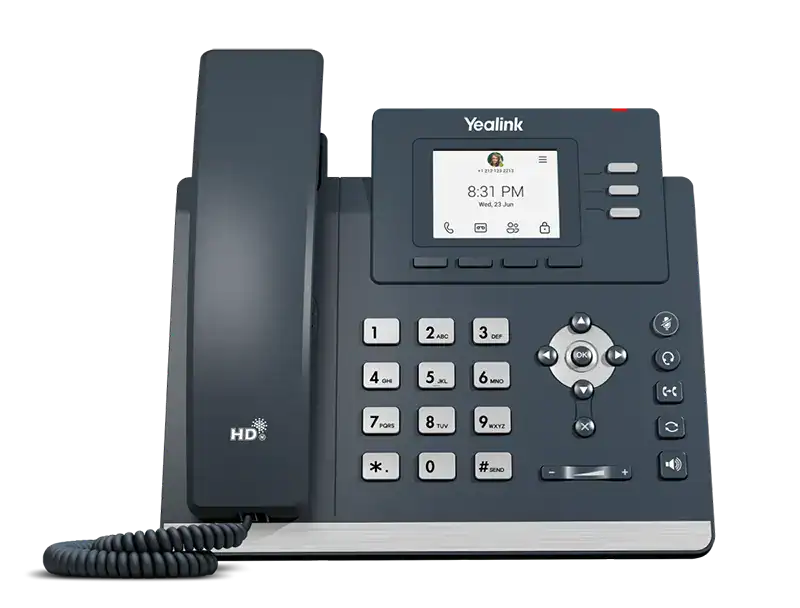
Yealink MP52 E2
Common Area Microsoft Teams PhoneDurable, cost-effective Teams phone for common areas, hospital corridors, school reception desks, and shared spaces. Non-touchscreen design with physical buttons resists daily wear. Powered by Android 15 and MDEP.
- 2.4" Non-Touch Screen
- Android 15
- AI Noise Cancellation
-
Gigabit PoE
- Wall Mountable
-
USB Headset Support

Yealink MP56 E2
Standard Teams Phone for Office Workers & Front DesksThe most widely deployed Teams phone in enterprise environments. The 7-inch capacitive touchscreen delivers a premium user experience, full Microsoft 365 integration, and expandability with up to 3 EXP50 modules — for organizations that need more on-screen control.
- 7" Touch Screen
- Android 15
- Bluetooth 5.2
-
Wi-Fi Dual-Band
- USB-C
-
EXP50 Support

Yealink CP965
Microsoft Teams IP Conference Phone — Medium to Large RoomsTwelve built-in microphones in a 360-degree array deliver a 20-foot voice pickup radius. Every participant is heard — regardless of where they sit. One-tap meeting join via Outlook calendar sync. The conference phone for Pakistani boardrooms and large meeting spaces.
- 12+1 Microphones
- 360° / 20ft Pickup
- 5" Touch Screen
-
Android 12
- One-Click Join
-
Wi-Fi + Bluetooth

Yealink MP54 E2
Entry-Level Teams PhoneThe ideal first Teams phone for general office workers. Touchscreen simplicity, dedicated Teams button, Bluetooth headset support, and SIP-Teams hybrid mode make it the most versatile entry-level choice for Pakistani organizations.
- 4" Touch Screen
- Android 15
-
Bluetooth 5.2
- Wi-Fi Dual-Band
- Hybrid Mode
-
Dedicated Teams Button

Yealink MP58-WH E2
Premium Microsoft Teams Phone for Executives & ProfessionalsFor C-suite and senior leadership. The MP58-WH E2 ships with Yealink's BTH58 Bluetooth wireless handset — walk away from your desk and stay on the call. Boss/Admin delegation, 7-inch adjustable touchscreen, and expandability to 180 contacts via EXP50 modules
- 7" Adjustable Screen
- Wireless Handset
-
Boss/Admin Mode
- Bluetooth 5.2
- Up to 180 Contacts
-
Hybrid Mode

Yealink MP55 E2
Purpose-Built for High Call Volume EnvironmentsEngineered for call centers, front desks, and reception environments in Pakistan. 10 programmable line keys with LED indicators enable rapid call handling, monitoring, and transfer — all without leaving the Teams interface.
- 4.3" Non-Touch Screen
- 10 Line Keys
- Wi-Fi 6
-
Bluetooth 5.0
- Android 15
-
Hybrid Mode
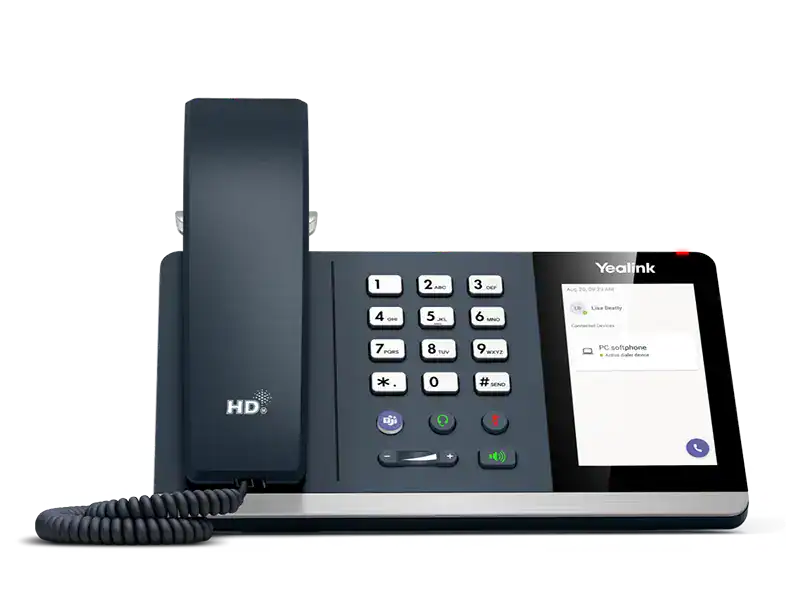
Yealink MP45
USB Teams Phone — No Network Configuration RequiredConnect via USB to any PC running Teams — it instantly recognizes and is ready to call. No IP setup, no SIP registration, no drivers. Perfect for hot-desking environments, training rooms, shared workstations, and rapid Teams rollouts at scale.
- 4" Touch Screen
- Plug & Play USB
- Busylight
-
HD Audio
- Hot Desking
-
Teams Compatible
Find the Right Model for Every Role in Your Organisation
Yealink Teams phones are not one-size-fits-all. Each model is engineered for a specific work context. Here is how Pakistani organisations typically deploy the range.
General Office Staff
Employees who make and receive Teams calls daily from a fixed desk. They need a reliable, intuitive phone that is easy to provision and requires minimal IT support.
Common Areas: Healthcare, Education, Hospitality
Shared phones in corridors, wards, reception counters, and hotel lobbies require durability, simplicity, and resistance to repeated use — without a touchscreen to maintain.
Call Centres & Front Desks
High call volume environments in Pakistan, where rapid transfer, hold, and multi-line monitoring are critical. Physical function keys and LED indicators outperform touch-only interfaces under pressure.
Hot Deskers & Flexible Workers
Employees who move between desks or workstations and need a Teams phone that works instantly wherever they sit — without network pre-configuration from IT for each location.
Executives & Senior Management
Senior leaders who need a premium desk presence, cordless mobility during calls, Boss/Admin delegation, and access to an extended corporate directory without switching screens.
Boardrooms & Large Meeting Rooms
Boardrooms and large conference rooms in Pakistan need 360-degree microphone coverage, one-tap meeting join from calendar, and a device that scales to large rooms without add-on microphones.
The Difference Between a Supplier and a Partner
Yealink Pakistan is the authorized distributor of Microsoft Teams certified phones in Pakistan. We do not drop-ship hardware — we deploy, configure, and stand behind everything we supply.
Authorized Distributor — Every Product Is Genuine
Formal Documentation for Corporate Procurement
Certified Teams Deployment Engineers
Post-Deployment Support & Maintenance Contracts
On-Site in Karachi, Lahore, Islamabad & Rawalpindi
Consultation Before We Recommend Anything
We assess your environment first — number of users, call patterns, existing Microsoft 365 licenses, SIP trunk, and network readiness. Then we recommend. We do not sell hardware you do not need.
Get Started
Ready to Deploy Microsoft Teams Phones Across Your Pakistan Office?
Tell us how many users, which cities, and what Microsoft 365 licences you are running. Our solutions team will prepare a formal proposal — hardware, services, and deployment timeline — within 4 business hours.
Quick Quote Turnaround
Formal quotation with full itemised pricing, delivered within 4 business hours of your inquiry.
On-Site Consultation Available
Our engineers visit your space, assess the room, and design the right solution before any hardware is recommended.
Genuine Products · Full Warranty
Authorized distributor stock only. Full Yealink manufacturer warranty on every device supplied.
Staff Handover & Training
Your team knows how to use every room before we leave — IT admins and end users both covered
FAQs
Common Questions About Microsoft Teams Phones in Pakistan
Answers to the questions we hear most often from Pakistani IT Managers, CTOs, and procurement teams before they place an order.
Where can I buy Microsoft Teams certified phones in Pakistan?
What is Teams Direct Routing and do you configure it in Pakistan?
What is the difference between the Yealink MP54 E2 and MP56 E2?
Can Yealink Teams phones work with a local SIP trunk in Pakistan?
What is the best Teams phone for a Pakistani call centre or contact centre?
Do you provide on-site installation and configuration of Teams phones in Pakistan?
What is the price of Yealink Teams phone in Pakistan?
What is the difference between a Teams certified phone and a regular SIP phone?
Do I need a Microsoft license for a Teams phone?
What is the best conference phone for Microsoft Teams in Pakistan?
The Yealink CP965 is the recommended Microsoft Teams conference phone for medium to large meeting rooms and boardrooms in Pakistan. It features 12+1 built-in microphones in a 360-degree array delivering a 20-foot voice pickup radius — every participant in the room is heard clearly regardless of seating position. It runs on Android 12 with a native Teams interface on a 5-inch touch screen, supports one-tap meeting join via Outlook calendar sync, and can be expanded with wireless microphone pods for larger spaces. Yealink Pakistan supplies and installs the CP965 with a full Teams configuration.
Do you configure Teams Direct Routing in Pakistan?
Yes. Yealink Pakistan's certified engineers deploy and configure Teams Direct Routing end-to-end across Pakistan. This includes SBC selection and deployment, SIP trunk integration with Pakistani providers such as PTCL and Nayatel, Teams Admin Center dial plan and voice routing configuration, PSTN gateway setup, and full provisioning of Yealink Teams phones. We handle the entire stack — you provide the requirement, we hand back a working system.
Can I use a Yealink phone with Teams without a Microsoft calling plan?
Yes. Through Teams Direct Routing, you can use your existing local SIP trunk provider in Pakistan — such as PTCL or Nayatel — for PSTN calling instead of a Microsoft Calling Plan. A certified Session Border Controller connects your SIP trunk to Microsoft Phone System. Your Yealink Teams phones then make and receive external calls through your local trunk. Yealink Pakistan deploys and configures the entire Direct Routing setup on-site.
Have a question not covered here?
Talk to Sales
Let's Build YourCommunication Infrastructure
Tell us what you need and our solutions team prepares a tailored proposal — hardware, services, and deployment timeline — within 4 business hours.
Prefer instant contact?
Request a Quote
The more detail you share, the more accurate our proposal.